
Does Intel® NUC kit NUC6CAYH (J3455) work with 16 GB of RAM memory?
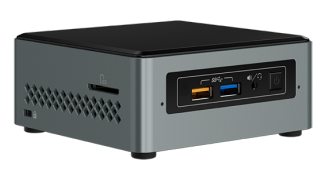
I use a few NUC Kit NUC6CAYH (that I call NUC J3455) mini PC computers and generaly like them for small size, fanless design and low power consumption.
Its four cores (Intel® Celeron® Processor J3455) used with Xubuntu offer performance that is actually enough to allow me to work efficiently.
hardware
Full NUC Kit NUC6CAYH specification is available here. And as you can see 8GB is Max Memory Size. And ‘Max Memory Size’ is defined as the maximum memory capacity supported by the processor.
But recently (Feb. 2021) I came across information that Celeron J3455 may also work with 16 GB of RAM here. User RTole4 wrote that he/she used 2x 8GB and BIOS reports 16GB.
I’ve bought two - for about 36 EUR each - goodram GR1600S3V64L11/8G (DDR3 8GB PC3 - 12800 SODIMM) modules and used them in new NUC6CAYH (date of manufacture 02/2021).
test, bios
NUC’s @VisualBIOS 2.2.23 recognized that total memory is 16GB (8GB per channel), at speed 1600MHz.
test, PassMark MemTest86 V9.0 Free
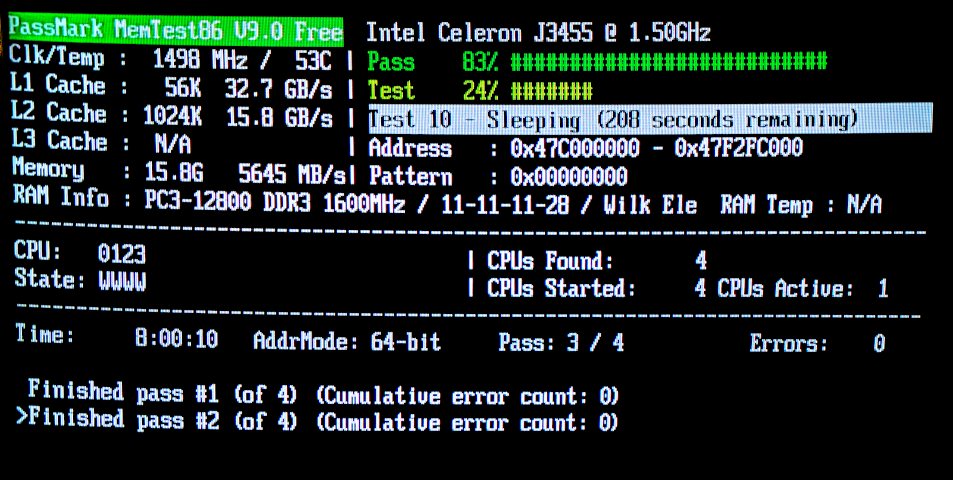
I used PassMark MemTest86 Free V9.0 Build 2000 tool to test this memory configuration. At least two passes of memory test sets went without error. As you can see it took over 8 hours and that is why I did not wait for full 4 pass test.
test, memtester
Second test was done with memtester command line tool that I read about here. In my case installed OS was debian 10.9.0 amd64. I’ve run memtester as shown bellow, with 1GB allocation at first time, and 15GB memory allocation at second time. Both tests were successful.
1 GB ram allocation (test took ~8 minutes):
root@nuc:~# memtester 1G 1
memtester version 4.3.0 (64-bit)
Copyright (C) 2001-2012 Charles Cazabon.
Licensed under the GNU General Public License version 2 (only).

pagesize is 4096
pagesizemask is 0xfffffffffffff000
want 1024MB (1073741824 bytes)
got  1024MB (1073741824 bytes), trying mlock ...locked.
Loop 1/1:
  Stuck Address       : ok
  Random Value        : ok
  Compare XOR         : ok
  Compare SUB         : ok
  Compare MUL         : ok
  Compare DIV         : ok
  Compare OR          : ok
  Compare AND         : ok
  Sequential Increment: ok
  Solid Bits          : ok
  Block Sequential    : ok
  Checkerboard        : ok
  Bit Spread          : ok
  Bit Flip            : ok
  Walking Ones        : ok
  Walking Zeroes      : ok
  8-bit Writes        : ok
  16-bit Writes       : ok

Done.
15 GB ram allocation (test took almost 2 hours):
root@nuc:~# memtester 15G 1
memtester version 4.3.0 (64-bit)
Copyright (C) 2001-2012 Charles Cazabon.
Licensed under the GNU General Public License version 2 (only).

pagesize is 4096
pagesizemask is 0xfffffffffffff000
want 15360MB (16106127360 bytes)
got  15360MB (16106127360 bytes), trying mlock ...locked.
Loop 1/1:
  Stuck Address       : ok
  Random Value        : ok
  Compare XOR         : ok
  Compare SUB         : ok
  Compare MUL         : ok
  Compare DIV         : ok
  Compare OR          : ok
  Compare AND         : ok
  Sequential Increment: ok
  Solid Bits          : ok
  Block Sequential    : ok
  Checkerboard        : ok
  Bit Spread          : ok
  Bit Flip            : ok
  Walking Ones        : ok
  Walking Zeroes      : ok
  8-bit Writes        : ok
  16-bit Writes       : ok

Done.
summary
It seems that NUC NUC6CAYH can handle 16 GB of RAM. And such configuration does not causes any troubles.